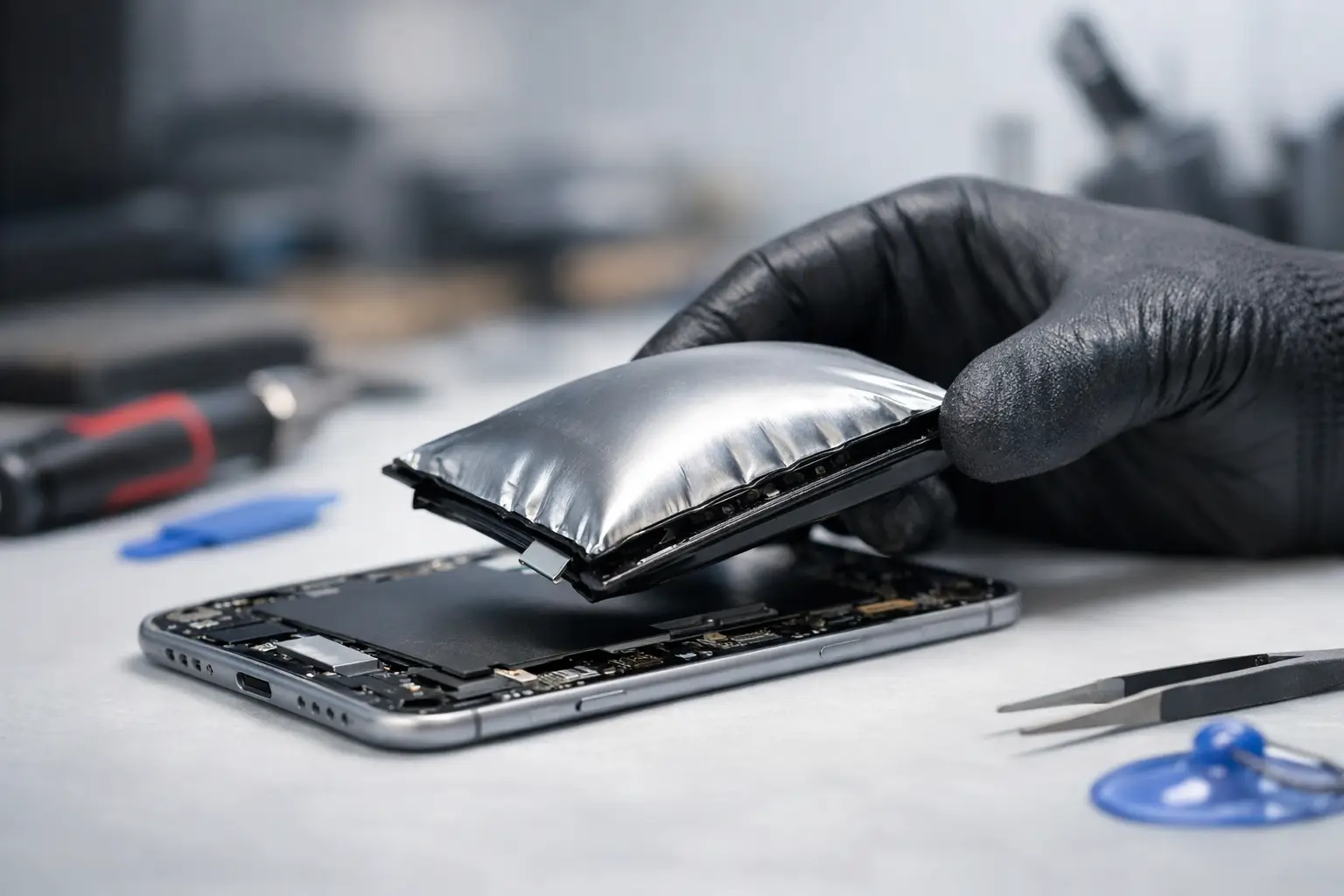
A phone screen lifting at the edge, a laptop trackpad that suddenly will not click, or a tablet case that no longer sits flat can all point to the same problem: a swollen battery. If you are asking, can a swollen battery be repaired, the honest answer is no – the battery itself cannot be made safe again. It needs professional removal and replacement.
That does not automatically mean your whole device is beyond saving. In many cases, a prompt battery replacement can prevent further damage and get your phone, tablet or laptop working properly again. The key is treating swelling as a safety issue, not a minor nuisance to put off until next month.
Why batteries swell
Most modern portable devices use lithium-ion or lithium-polymer batteries. They are compact, powerful and rechargeable, but they are chemical components with a limited lifespan. As a battery degrades, internal reactions can create gas. Because the battery is sealed, that gas has nowhere to go, so the cell expands.
Age is a common cause. A phone or laptop that has been through several years of charging cycles may eventually develop a swollen battery, even if it has been well looked after. Heat can speed up deterioration, particularly when devices are regularly left in hot cars, used heavily while charging, or charged under bedding and cushions where heat cannot escape.
Physical damage and liquid exposure can also affect a battery. So can poor-quality charging accessories, electrical faults, and manufacturing defects. There is not always one clear reason, which is why an inspection matters. Replacing the battery without checking for damage to the charging circuit, screen, casing or internal connectors can leave an underlying fault unresolved.
Can a swollen battery be repaired, or only replaced?
A swollen battery cannot be repaired, flattened, drained back to normal, or safely reused. Once its internal structure has failed, its condition is unpredictable. Trying to press it flat, pierce it, freeze it, or continue charging it creates a real fire risk.
What can often be repaired is the device around it. A swollen battery may push against a display, split the rear cover, bend a laptop chassis, or put pressure on delicate internal parts. The earlier it is dealt with, the better the chance of avoiding extra work.
For example, an iPhone with a slightly raised screen may only require a new battery and a careful reseal. Leave it charging and in daily use, however, and the expanding cell could damage the display or frame. On a MacBook or Windows laptop, battery swelling can lift the trackpad, affect the keyboard, or distort the bottom case. A professional assessment establishes whether the battery is the only issue or whether other components need attention too.
Signs you should stop using the device
Battery swelling is not always obvious at first. A device may still switch on, charge normally and seem perfectly usable, but the physical clues should never be ignored.
Look for a screen separating from the frame, a back cover lifting, a gap appearing around the case, or a device that rocks when placed on a flat surface. On laptops, a raised trackpad, stiff keys, or a case that no longer closes evenly can be warning signs. You may also notice unusual heat, a sudden drop in battery life, random shut-downs or a chemical smell.
If you spot any of these signs, stop charging the device. Switch it off if you can do so without forcing buttons or pressing on the swollen area. Keep it on a hard, non-flammable surface away from direct sunlight, heaters, children and pets. Do not place it in a drawer, bag, car or household bin.
A swollen battery does not always catch fire, but it has already failed in a way that needs attention. It is not worth taking chances with a device that lives beside your bed, in a school bag, or on a desk at work.
What not to do with a swollen battery
It can be tempting to search for a quick fix, especially if the device contains photos, work files or messages you need. However, these are the actions that can turn a repairable device into a dangerous situation:
- Do not continue charging it, even for ‘just a few minutes’.
- Do not press the screen or casing back into place.
- Do not puncture, cut, bend or attempt to remove the battery yourself.
- Do not use heat, cold, tape or clamps to change the battery’s shape.
- Do not throw it into normal rubbish or recycling.
Damaged lithium batteries need appropriate handling and disposal. A repair specialist can remove the battery with the correct tools and arrange responsible disposal, rather than leaving a hazardous cell in a household waste stream.
Protecting your data while the battery is replaced
For most people, the biggest worry is not the battery itself. It is everything stored on the device. Family photos, banking apps, schoolwork, business documents and saved logins can make handing over a phone or laptop feel stressful.
If the device remains stable and can be used without charging, back it up straight away. Use a trusted cloud backup or transfer essential files to another device. Do not keep using it simply to complete a full clean-up or organise thousands of files. Safety comes first.
If the battery is too swollen for the device to be safely powered on, a repair technician can advise on the next step. In many cases, fitting a replacement battery allows the device to start normally again, preserving access to its data. Where there is additional damage, the repair should be assessed carefully before any work begins.
For business and school devices, this matters even more. A single swollen laptop battery can affect staff productivity, lesson planning or access to important files. Keeping the device switched off and arranging a prompt inspection is usually far less disruptive than waiting for it to fail completely.
Is battery replacement worth it?
Whether a replacement is worthwhile depends on the device, its age and the wider condition of its hardware. On a recent phone, tablet or laptop that otherwise performs well, replacing a swollen battery is usually a sensible and cost-effective option. It can restore portability, improve runtime and prevent the damage from getting worse.
An older device may need a more balanced decision. If it also has a cracked screen, major liquid damage, charging problems or an unreliable motherboard, the total repair cost may not make sense compared with replacement. A good repair service should explain that clearly rather than fitting parts that do not offer value.
There is also an environmental benefit to repair. Replacing one failed battery keeps a usable device in service and reduces unnecessary electronic waste. That is particularly relevant for families with several devices, and for businesses or schools managing a larger fleet of phones, tablets and laptops.
What a professional swollen battery repair involves
Safe battery work is more than swapping one part for another. The device should be checked for casing distortion, screen damage, heat damage and charging faults before the battery is removed. Adhesives and connectors vary widely between models, so the correct approach for an iPhone is not necessarily the correct approach for a Samsung handset, iPad, MacBook or gaming controller.
The damaged battery is carefully removed, and the device is inspected for anything the swelling may have affected. A suitable replacement battery is fitted, the device is tested for charging and power stability, and the casing is reassembled correctly. Where a screen or rear cover has been pushed out of place, it may need separate attention to ensure the device is secure again.
At TechLab Repairs, the focus is on giving you a clear answer before work goes ahead. If your device is a good candidate for repair, a battery replacement can be a fast way to get it back into dependable daily use. If swelling has caused wider damage, you should know your options and likely costs upfront.
A lifted screen or warped laptop case is your cue to act, not wait. Keep the device switched off, avoid charging it, and arrange a professional inspection as soon as possible. A safe replacement now can protect your device, your data and the people around it.